
UPDATES FROM THE DEVELOPMENT TEAM
24/6/2026 (Sprint 56, ongoing)
Project Sharing
- Users in the Twizzdom Editor can now change project and template sharing settings (previously available in the Admin Panel).
- When a user creates a new project or template, it will be private by default.
- To share a project or template, click the Share button in the header bar at the top of the Editor page.


- This will bring up the same settings in the Admin Panel. A project or template can be shared with individual users or All Twizzdom Users. Share access can be set to “Can view” or “Can edit”.
- Share status icons are displayed in the top left of project tiles and template tiles in the dashboard. This makes it convenient to browse at-a-glance which are private, shared with individual users, or shared with all Twizzdom users.

- Fixed some bugs regarding incorrect permissions applied to shared projects and templates.
- Note: A future update will include Organizations and Organization-level sharing.
Resource File Uploads
- Below is a summary of the current state of resource uploading and roles. Some of these changes are new; some are simply a summary of the current setup for clarity.
- Twizzdom user role “Teacher”:
- Has a 1GB total file storage limit (no change)
- Can upload images and audio in the Editor (no change)
- Cannot upload videos during Beta (no change)
- Cannot access Custom Code Resources (no change)
- This role is for external users
- Twizzdom user role “Tester” (now “Holmwoods”):
- Renamed to “Holmwoods” for permissions clarity (NEW)
- Has no total file storage limit (NEW)
- Can upload images, audio and video in the Editor (no change)
- Can access Custom Code Resources (no change)
- Used for internal Twizzdom employees
- Admin Panel user:
- Has no file storage limit (no change)
- Can upload images, audio and video in the Admin Panel (no change)
- Fixed issue where Admin role could be set to False (checkbox is now True by default and disabled). Note: All Admin Panel users have had their Admin role set to True (base permission required).
- Fixed issue where Super Admin had a case where it was not inheriting correct Admin permission.
- Individual file upload size limits:
- Image increased from 2MB to 5MB (NEW)
- Audio increased from 5MB to 20MB (NEW)
- Video set at 2GB (no change)
Question Library Bulk Upload
- Will now display a user-friendly error when duplicate questions are detected.
- Fixed template to contain flawless examples.
- The bulk upload spreadsheet template is now linked to a cloud document in Microsoft SharePoint. This standardizes the display for users across all platforms, since the downloaded spreadsheet displays differently on the desktop app for formulas and dropdowns.
Known Issues
- If the dashboard repeatedly gives an unauthorized page error for your login credentials – delete your browser cache, including cookies.
Your content goes here. Edit or remove this text inline or in the module Content settings. You can also style every aspect of this content in the module Design settings and even apply custom CSS to this text in the module Advanced settings.
__________________________________________________________________
22/6/2026 (Sprint 55)
Media Library
- Media library tab added to dashboard – this allows users to browse the resources (image, audio, video) they have uploaded using the Editor. Note that this does not display resources a Holmwoods admin has uploaded in the Admin Panel, as they use a different account type.
- This is part one of the implementation. More is to come, including improved styling.
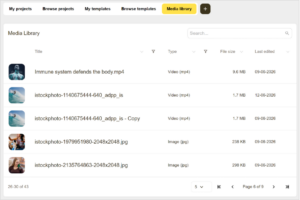
- Resource metadata is displayed in columns including thumbnail, title, type, file size and last edited date (share, details, favorites, edit, delete to come).
- Title and Type columns can be filtered individually (more to come).
- Columns can be sorted individually by ascending or descending.
- Global search field will filter Title column (more columns to be included).
- Pagination including page size dropdown.
Other Updates
- Fixed canvas alignment not centering after clicking between Game or Quiz slide and other slides.